
Do I need the ClickBytes group for Dungeon Lootr codes?
Yes on current builds — join the developer group before Menu → More → Codes, or many SUBMIT attempts reject.

How to redeem Dungeon Lootr codes: join ClickBytes, open Menu → More → Codes, paste Working strings exactly. Fail fixes included. Verified August 2026.
Watch the lobby Menu → More → Codes path, then paste exact Working strings once.
~7 min read

This page answers how to redeem Dungeon Lootr codes on Roblox for Place 106484206883664 (Dungeon Lootr by ClickBytes). The Working list lives on codes — here you get the lobby HUD path: join ClickBytes, open Menu → More → Codes, paste exact case once, then collect. Community footage from release week shows that exact control under More. Verified August 29, 2026. Play on Roblox.
| Fact | Detail |
|---|---|
| Working codes now | 24 |
| Last codes check | August 29, 2026 |
| Developer | ClickBytes |
| Platform | Roblox |
| Place ID | 106484206883664 |
| Group gate | ClickBytes membership required |
| HUD path | Menu → More → Codes → SUBMIT |
| Working list | codes |
| Discord monitor | discord.gg/dungeonlootr |
| Play | Play on Roblox |
Redeem is a filter, not a scavenger hunt. Gather these facts first so you do not burn a one-claim string on the wrong account or title.
| Prerequisite | Pass | Fail |
|---|---|---|
| Place ID | Join screen shows 106484206883664 | Any other dungeon Roblox title |
| ClickBytes group | Joined before opening Codes | Every SUBMIT rejects |
| Working row | Real Code cell + Working status | Expired archive or chat-only string |
| HUD control | Codes field under Menu → More | No button after lobby load |
| Account | Same user you play on | Alt that never enters the experience |
As of August 29, 2026, Working count is 24. If a string is missing from codes, do not paste it “just in case.” Open Discord for discovery, then wait for the Working table — or test only after you accept it may Invalid.
Announcements on discord.gg/dungeonlootr may surface a candidate string. You still redeem inside Roblox after this wiki marks it Working. Staff will not DM you a private “admin code” that requires a password.
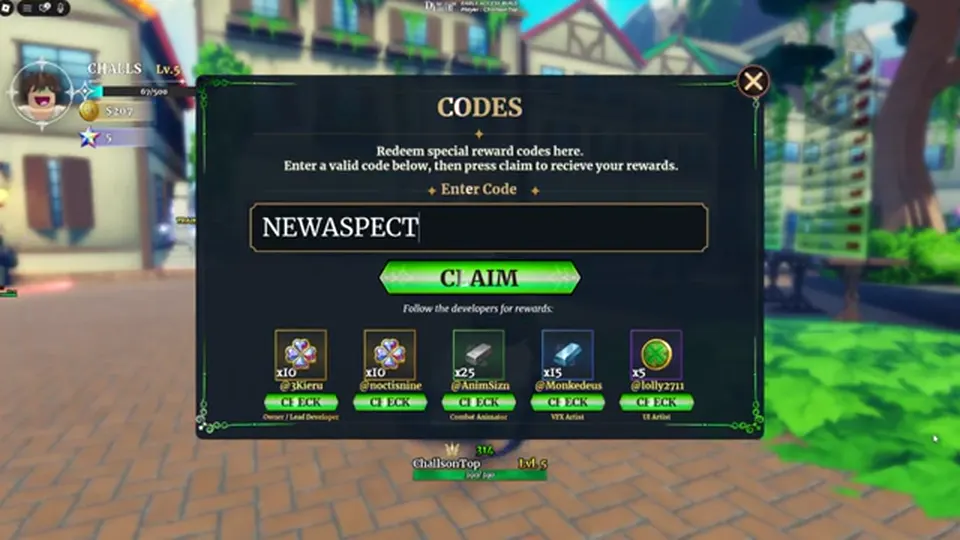
Use this sequence when the Codes field exists. Community redeem guides and release-week footage agree on Menu → More → Codes → SUBMIT.
| Step | Where | Success looks like |
|---|---|---|
| 1. Join group | Roblox groups | ClickBytes membership active |
| 2. Join experience | Roblox | Place 106484206883664 loads lobby |
| 3. Confirm Working | codes | Real Code string, not Expired |
| 4. Open Codes | Menu → More → Codes | Text field accepts paste |
| 5. Paste once | Redeem field → SUBMIT | No trailing space or second line |
| 6. Collect | Inventory | Reward visible after toast / optional relog |
Prefer Copy from a Working Code cell when CodeCopyButton is live. Extra spaces, wrong case, and multi-line pastes are classic Instant Invalid causes. Spoken lists often garble LOOTR and EARLYACCESSYAY — do not trust ASR spelling.
If the toast says already redeemed, that string is done for this Roblox user. Do not rotate alts hoping for a second grant unless an official post explicitly allows it — most Roblox code systems do not.
Look in the lobby — not mid-extract. Open the on-screen Menu, choose More, then tap the Codes icon at the bottom of that panel to open the redemption box. If you only see shop / gamepass panels, you are in the wrong submenu.
| UI cue | Meaning | What to do |
|---|---|---|
| Menu → More → Codes | Correct redeem path | Paste Working string once |
| Only BUY SHOP / gamepasses | Paid spends ≠ codes | Back out; open More |
| Forge / Classes menus | Progression systems | Redeem first, then forge |
| In-dungeon HUD only | Wrong context | Extract or return to lobby |
| Friend has Codes, you do not | Different Place / patch / group | Compare Place ID + group first |
Some lobby menus also surface Follow Developers style claims. That path can grant extra rewards but is not a substitute for the Codes field. Finish Codes first, then claim any separate follow rewards if present.
Early Access menus rename often. If More moves, recheck discord.gg/dungeonlootr and this page after a patch — do not invent a random gear icon as “Codes.”
Matched by build plan, shared topics, and guide progression — not random related links.
Match the toast or symptom before you paste a second candidate. Most failures are filter problems, not broken servers.
| Symptom | Likely cause | Fix |
|---|---|---|
| Invalid instantly | Typo, expired, wrong game, missing group | Match Place ID; join ClickBytes; Working only |
| Already redeemed | One claim per account | Skip that string |
| No Codes button | Wrong menu / UI patch | Menu → More; recheck Discord |
| Accepted but empty bag | Need relog / wrong user | Relaunch same account |
| Works on a blog, fails in-game | Fake WORKING list | Trust wiki Working table |
| Every code fails the same way | Group gate not met | Join ClickBytes, then retry one |
Strings such as BETTERQOL, ARCHON, GROUP, RELEASE, and LEVEL_30 / 40 / 50 now live on the Expired table. Instant Invalid is expected — see codes for the live split.
If the field freezes, wait one timeout and check inventory before pasting again — double-submit can flip a valid string into Already redeemed with no reward visible if the first call actually landed.
Use this mid-page decision table whenever a friend, Discord message, or aggregator shows a “new code.”
| If… | Then… | Next |
|---|---|---|
| Working table has the exact string | Paste once in Codes field | Collect → extract / Forge |
| String is on Expired archive | Do not paste | Ignore thumbnail lists |
| String only on a thumbnail list | Skip | Ask for Discord source |
| Place ID is not 106484206883664 | Leave the experience | Join correct Place |
| ClickBytes group not joined | Join group first | Then open Codes |
| No Codes button under More | Skip paste attempts | Recheck after patch |
| Toast says Already redeemed | Stop retrying | Mark personal used list |
Place ID match → ClickBytes joined → Working row → field visible → single paste → inventory check. Fail any gate and you skip. That habit beats “try every code in the comments.”
Bank the reward into the loop that actually raises clear speed. Codes that drop Forge Stones, Reforge Stones, Aspect Gems, Luck Potions, or GM Blessings are fuel — not a reason to idle in the lobby.
| Reward type | Spend on | Avoid |
|---|---|---|
| Forge / Reforge stones | Clear-speed weapon / armor | Fashion-first crafts |
| Aspect Gems | Aspects rolls | Hoarding forever with no Challenge plan |
| Luck potions | Chest-heavy extracts | Wasting them in a wipe run |
| GM Blessings / chests | Open when you can use the loot | Ignoring inventory stack |
| Stars / coins | Progression spends you already planned | Impulse shop spam |
If you still die with a full bag, open the beginner guide and tips. When extracts feel easy, shift materials into forge, then Boss Rush and Challenge Dungeon.
Release weekends and milestone codes rotate fast. Bookmark codes and discord.gg/dungeonlootr — then spend the rest of the session playing Place 106484206883664, not refreshing aggregator thumbnails.
Yes on current builds — join the developer group before Menu → More → Codes, or many SUBMIT attempts reject.
Lobby Menu → More → Codes (bottom of the More panel). Redeem in lobby, not mid-dungeon.
Expired string, typo, wrong Place ID, missing group, or already redeemed. Filter through the Working list first.
Usually no — most Roblox code claims are one per account. Official posts would need to say otherwise.
No. They are optional materials. Extract, Forge, and mode unlocks still carry the account — see beginner guide.
Matched by build plan, shared topics, and guide progression — not random related links.